If you’re a small business owner, you’ve probably heard a lot of noise about what you “should” be doing when it comes to digital marketing. From SEO and social media to ads and analytics, it can feel like too much, too fast.
This post is here to simplify things. Whether you’re just getting started or trying to make sense of what you’ve already built, we’ll walk through the marketing basics that actually matter—and leave out the stuff that doesn’t. No hype, no pressure—just real talk for real businesses.
Contents
- Information All Small Businesses Should Know
- Why is it important to know this information
- What are they
- Summary
- FAQ
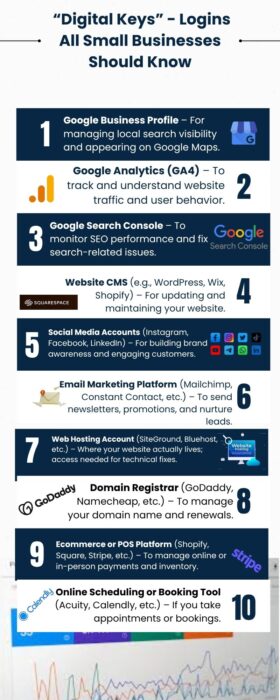
There are 3 pieces of information for small business to know about business and 2 optional ones.
Information for small business to know
- Website CMS admin login
- GSC login
- GA4 login
- GBP login (Optional, if you have a local business.)
- Google Ads login (Optional, if you are running Google Ads.)
You’re probably thinking someone within your business knows this information or has it recorded somewhere. Your website manager, operations person, admin etc. It’s been delegated to someone else who you know and trust. That’s great. My suggestion is to have all these important “logins” in a common folder and/or document shared amongst all the relevant people within your company including the owner, founder, CEO etc.
Why is this information important?
It’s the history and “life” of the digital part of your business. Without this information it’s like driving a car blind. The data can be used to help you navigate what you do with your website and online presence of your business, next.
What are these?
Website CMS admin login
Your website CMS admin login is what gives you access to the backend of your website so you can make changes. Even if you don’t know how to make these changes yourself or don’t have time, knowing the login is like having the “keys” to your house. You’re not going to let the builder of your house keep the keys to your house? You’ll want keys so you can get in and out or at least have access so you can let others in.
GSC Login
Google Search Console or GSC is the data for the traffic to your website. It may take a while for this data to accumulate, but as it does, you can use it to make changes, additions, etc to your website so that you can optimize your website for search engines over time. In otherwise, it’s good information to help you optimize your site for organic traffic.
GA login
Google Analytics, or GA, is more data about your online presence over time. It included other channels of traffic besides organic; demographic information about your website visitors; actions made on your website by your visitors and more. All information to help you navigate the next steps of your online presence.
GBP login
Google Business Profile or GBP is something every “local” business should sign up for. Why should have a GBP? Because it’s free and it’s one more way to add to your online presence. There are analytics associated with GBP as well which can be used to optimize not only this online profile but also can be used to navigate what your do with website as well.
Google Ads
If you are running Google Ads, it’s in your best interest to know the login so you can get in there or at the very least, hand it over to someone else who may be managing your paid Google Ads. It’s a direct way to monitor your ad spend, ad campaigns, ads.
Summary
Running a small business is already a lot of work. You’re wearing many different hats and it’s impossible to be an expect in all the roles. You’re an expect in what you specialize in and are offering, whether that’s a service of product. When it comes to marketing, it’s easy to feel overwhelmed by jargon, big promises, or shiny tools that don’t seem to deliver. The three digital keys you should keep at your side at all times are,
- Website CMS admin login
- GSC login
- GA4 login
Two optional digital keys are,
- GBP login (Optional, if you have a local business.)
- Google Ads login (Optional, if you are running Google Ads.)
Having these keys in your possession will allow you access to all the information that is being collected or stored. While it may not be possible to understand everything the data is telling us, having full control and access to it, is the first step to your digital marketing success.
FAQ
Start with the basics: a Google Business Profile, a simple website with clear messaging, and one channel where you show up consistently (like email or Instagram). From there, you can build as your audience grows.
You can absolutely do a lot yourself, especially early on. Tools like Canva, Mailchimp, and Google Search Console make it easier than ever. But if you’re stuck or scaling, bringing in a consultant or freelancer can save time and avoid costly mistakes.
If it feels pushy, expensive, or too good to be true, it probably is. Ask: “How will this help my specific business goals?” A good marketer will welcome that question. A red flag is someone who avoids it.